Technology
Lexmark MX711: MX711de MFP, Toner, Specs & Support
The Lexmark MX711 remains one of the most reliable high-volume monochrome laser multifunction printers (MFPs) still operating in offices across the world in 2026. Designed for demanding enterprise environments, the MX711de, MX711dhe, and MX711dthe models continue serving legal firms, hospitals, schools, banks, and government departments that need fast printing, heavy-duty scanning, enterprise-grade security, and ultra-low cost per page.
Even though the series is officially discontinued for new sales, support, toner, replacement parts, drivers, and onsite service are still widely available in 2026. With support for 45,000-page toner cartridges, 132 ipm duplex scanning, and a massive 350,000-page duty cycle, the MX711 is still considered a true office workhorse.
Here’s the complete 2026 breakdown of the Lexmark MX711 series, including specifications, toner options, paper handling, operating systems, enterprise security, common issues, and whether it is still worth buying today.
What Is Lexmark MX711? 2026 Overview

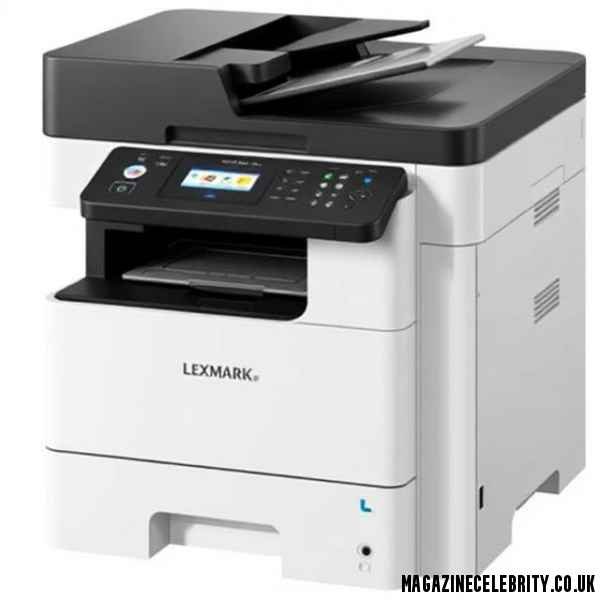
What Is Lexmark MX711? 2026 Overview
The Lexmark MX711 is a black-and-white laser multifunction printer built for medium-to-large workgroups that need high-speed printing, copying, scanning, faxing, and email functionality from one machine.
The most common version is the Lexmark MX711de, where:
- d = Duplex printing
- e = e-Task touchscreen interface
The MX711 family was engineered specifically for organizations with monthly print volumes ranging from 5,000 to 100,000 pages.
Key MX711 Models 2026
Lexmark MX711de
- Base enterprise model
- Duplex printing
- Networking support
- e-Task touchscreen
Lexmark MX711dhe
- Adds integrated hard disk drive
- Enhanced document storage
- Better workflow management
Lexmark MX711dthe
- Adds hard drive plus extra paper tray
- Higher paper capacity
- Better for heavy print environments
2026 Status
Although officially discontinued, the MX711 remains:
- Widely deployed
- Fully serviceable
- Compatible with modern operating systems
- Supported with aftermarket and OEM toner
Many businesses now purchase:
- Refurbished units
- Lease returns
- Certified enterprise reconditioned models
because the MX711 still outperforms many newer office printers in durability and scanning speed.
Lexmark MX711 Specs 2026: Print, Scan, Copy & Fax

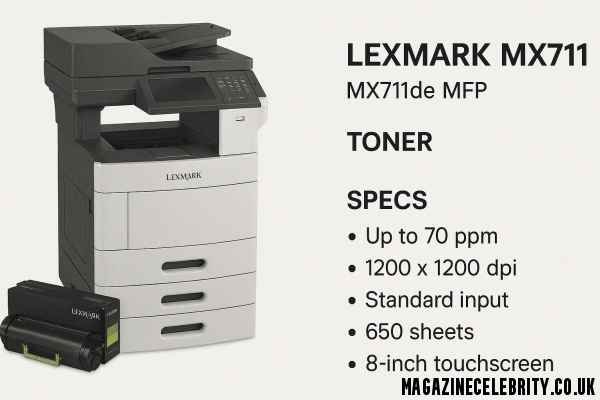
Lexmark MX711 Specs 2026: Print, Scan, Copy & Fax
The MX711 was designed for enterprise productivity. Even in 2026, its specifications remain highly competitive for monochrome office printing.
Print Specifications
| Feature | Specification |
|---|---|
| Print Speed | Up to 66 ppm |
| First Page Out | As fast as 4.8 seconds |
| Resolution | 1200 x 1200 dpi |
| Processor | 800 MHz dual-core |
| Standard Memory | 1 GB |
| Maximum Memory | 3 GB |
| Duty Cycle | Up to 350,000 pages/month |
| Recommended Volume | 5,000 – 100,000 pages |
The combination of:
- fast warmup
- enterprise memory
- high-resolution output
makes the printer ideal for:
- legal documents
- invoices
- medical records
- government paperwork
Scan Specifications
One of the strongest MX711 features is its single-pass duplex scanning system.
Scanner Features
| Feature | Specification |
|---|---|
| Scanner Type | Flatbed + DADF |
| ADF Capacity | 150 Sheets |
| Simplex Speed | 66 spm |
| Duplex Speed | 132 spm |
| Optical Resolution | 600 x 600 dpi |
Scan Destinations
The MX711 supports:
- FTP
- USB
- Network folders
- LDSS
- USB flash drives
Supported File Formats
- Secure PDF
- TIFF
- JPEG
- JPG
- XPS
- Searchable PDF with OCR
This makes the device extremely valuable for organizations digitizing large paper archives.
Copy & Fax Features
Copy Performance
- Up to 66 copies per minute
- Automatic duplex copying
- Advanced scaling options
Fax System
- 33.6 Kbps modem
- Analog fax support
- Enterprise fax routing
All MX711 models include:
- integrated duplex printing
- advanced paper handling
- workflow automation
Lexmark MX711 Toner 2026: 45K Yield Cartridges
The biggest reason many businesses still use the MX711 is the incredibly efficient 45,000-page toner system.
Toner Options 2026
| Part Number | Type | Yield |
|---|---|---|
| 62D1X00 | Return Program | 45,000 |
| 62D0XA0 | Standard | 45,000 |
| 62D3X00 | EU Return Program | 45,000 |
| 62D3X0E | Corporate Return | 45,000 |
| 52D1X00 | MX/MS Series | 45,000 |
| 62D2000 | Standard Yield | 6,000 |
Unison

Lexmark’s Unison Toner delivers:
- consistent image quality
- shake-free operation
- low friction performance
- reduced waste
This lowers total operating costs dramatically for high-volume environments.
Return Program Explained
Many cartridges are sold under Lexmark’s Return Program.
This means:
- lower upfront cartridge price
- single-use licensing
- mandatory cartridge return for recycling
After reaching programmed yield limits, the cartridge stops functioning even if some toner remains.
Businesses wanting maximum flexibility often choose:
- regular cartridges
- remanufactured enterprise cartridges
instead.
Lexmark MX711 Compatible Devices 2026
One major advantage of the MX711 platform is broad cartridge compatibility.
Compatible Printer Series
The 45K cartridge platform works with:
- MX711de
- MX711dhe
- MX711dthe
- MX810 series
- MX811 series
- MX812 series
Including:
- MX810de
- MX810dfe
- MX811dte
- MX812dtpe
and more than 30 variants overall.
This compatibility makes toner sourcing easier and helps organizations standardize inventory.
Lexmark MX711 Paper Handling 2026
The MX711 was built for nonstop office production.
Capacity & Media Handling
| Feature | Specification |
|---|---|
| Standard Input | 650 Sheets |
| Max Input | 3,300 Sheets |
| Output Capacity | 550 Sheets |
| Paper Weight | 60-176 g/m² |
| ADF | 150-Sheet DADF |
Supported Media Types
- Plain paper
- Labels
- Card stock
- Envelopes
- Transparencies
The optional tray system allows organizations to configure:
- multi-department workflows
- high-volume print queues
- mixed paper environments
without frequent reloading.
Lexmark MX711 Software & OS Support 2026
Despite its age, the MX711 still supports modern operating systems.
Supported Operating Systems
Windows
- Windows 11
- Windows 10
- Windows 8.1
- Windows Server 2022–2003
Mac
- macOS support via updated drivers
Linux
- Ubuntu
- Fedora
- Debian
- Mint
- Red Hat
- SUSE
UNIX Enterprise
- IBM AIX
- HP-UX
- Sun Solaris
VueScan Compatibility 2026
Many organizations now use VueScan with the MX711.
VueScan Features
- Works over network
- No Lexmark driver required
- Flatbed support
- DADF support
- AI Super Resolution
- Auto-crop
- Orientation detection
Important Note
USB scanning may not work with VueScan. Network connection is recommended.
Lexmark MX711 Security & Enterprise Features 2026
Security remains one of the MX711’s strongest selling points.
Enterprise Security Features
Hard Disk Encryption
Available on “h” models.
Secure Document Formats
Supports:
- Secure PDF
- Archival PDF A-1a/A-1b
Network Security
- IPSec
- SNMPv3
- 802.1x authentication
User Authentication
- PIN release printing
- LDAP integration
- audit logging
Disk Wiping
Sensitive environments can securely erase stored data.
This is why MX711 printers remain common in:
- healthcare
- legal firms
- banking
- education
- government
Lexmark MX711 Service & Warranty 2026
Although discontinued, enterprise support still exists.
Onsite Service Options
| Service Type | Availability |
|---|---|
| 3-Year Onsite | Available |
| Post-Warranty Repair | Renewable |
| 7-Year Coverage | Available on prior purchase |
Coverage Includes
- Parts
- Labor
- Diagnostics
- Onsite technician visits
Lexmark-certified technicians are dispatched if phone support cannot resolve issues remotely.
LexmarkMX711 vs MX810/MX811/MX812 2026
The MX711 sits in the middle of Lexmark’s enterprise monochrome lineup.
| Model | Speed | HDD | Finisher |
|---|---|---|---|
| MX711 | 66 ppm | Optional | No |
| MX810 | 55 ppm | Standard | Optional |
| MX811 | 66 ppm | Standard | Optional |
| MX812 | 70 ppm | Standard | Optional |
Key Difference
The MX711 offers:
- excellent speed
- lower acquisition cost
- shared toner ecosystem
while the MX812 provides maximum performance.
Lexmark MX711 Pros & Cons 2026
Advantages
45,000-Page Toner
Extremely low cost per page.
132 ipm Duplex Scanning
Excellent for document digitization.
350K Duty Cycle
Enterprise Security
Encryption and authentication included.
Reliable Workhorse
Many units still operating after years of heavy use.
Disadvantages
Discontinued
New units are difficult to source.
Large Size
Footprint:
- 22.6 x 25.5 x 26.5 inches
FCC Class A
Not ideal for home use.
Return Program Restrictions
Some cartridges lock after rated yield.
No Native Modern Cloud Features
Older workflow system compared to newer MFPs.
Lexmark MX711 Common Issues & Fixes 2026
Cartridge Region Mismatch
Use toner designed for your geographic market.
Check:
Scan to Email Failure
Usually caused by:
- outdated SMTP settings
- TLS mismatches
- firmware issues
Updating firmware often fixes the problem.
Paper Jams
Use supported media weights:
- 60-176 g/m²
Clean rollers regularly.
Driver Problems
Use:
- Lexmark Universal Driver
- VueScan
for best compatibility.
Final Verdict: Should You Buy Lexmark MX711 in 2026?
The Lexmark MX711 remains one of the best high-volume monochrome office printers still operating in 2026.
Buy It If You Need
- Heavy-duty black & white printing
- Fast duplex scanning
- Enterprise-grade reliability
- Low cost per page
- High monthly print volumes
Avoid It If You Need
- Color printing
- Compact office hardware
- Modern cloud-first workflows
- Brand-new warranty coverage
Best Use Cases 2026
- Hospitals
- Schools
- Government agencies
- Legal firms
- Accounting departments
Bottom Line
Even years after discontinuation, the Lexmark MX711de series continues delivering exceptional reliability, low operational cost, and enterprise scanning performance. Pairing the device with 62D1X00 45K toner and ongoing Lexmark onsite support still gives organizations one of the best total cost-of-ownership setups for monochrome document production in 2026.
FAQs About Lexmark MX711 2026
1. Is the Lexmark MX711 discontinued?
Yes. The MX711 series is discontinued for new sales but still supported with toner, parts, and service.
2. What toner does the MX711 use?
The most common cartridge is the 62D1X00 45,000-page toner.
3. Can MX711 scan duplex in one pass?
Yes. It supports single-pass duplex scanning up to 132 ipm.
4. Does MX711 work with Windows 11?
Yes. It supports Windows 11 using Lexmark Universal Drivers.
5. Is the LexmarkMX711 good for large offices?
Absolutely. It is designed for monthly volumes between 5,000 and 100,000 pages.