Technology
How to Fix a Broken Screen Protector in 2026? Complete Step-by-Step Guide

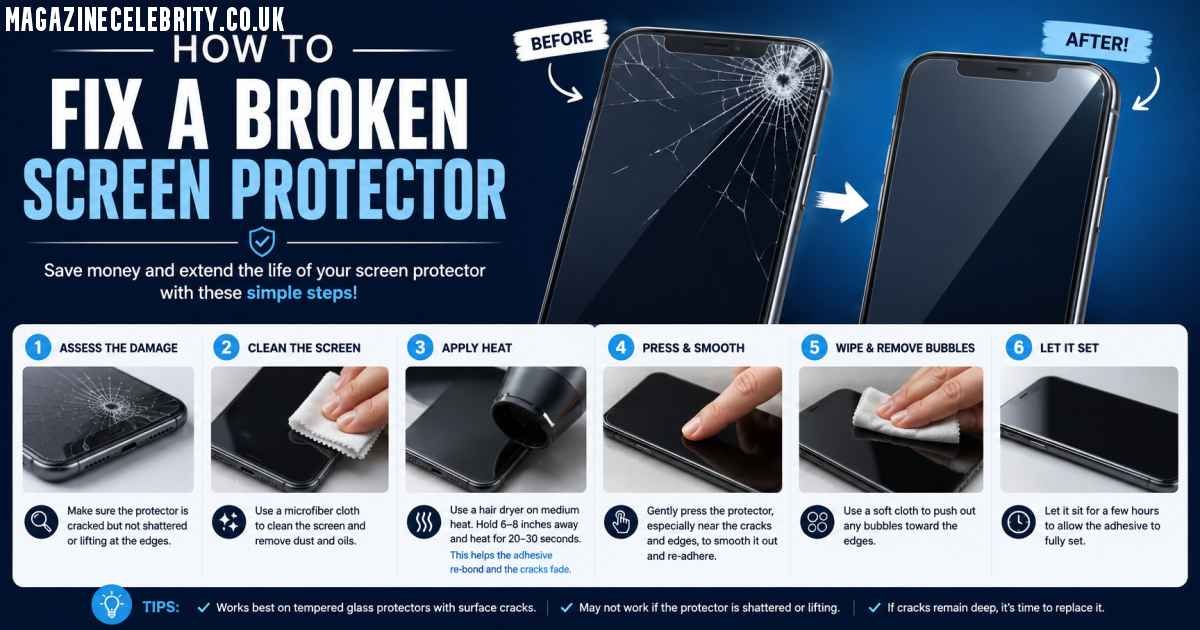
A cracked screen protector can instantly make even the newest smartphone look damaged and frustrating to use. The good news is that in 2026, replacing a broken screen protector is easier than ever. Whether you use a tempered glass protector, TPU film, or the latest self-healing hydrogel screen protectors, you can safely remove and replace it at home in under 10 minutes without damaging your real display.
The most important thing to understand is this: you cannot truly repair a cracked screen protector. Once it breaks, bends, or creases, its protective structure is compromised. The real solution is safely removing the damaged protector and installing a new one properly.
This complete guide explains exactly how to identify your protector type, remove it safely, avoid damaging your phone, and install a replacement like a professional.
Should You Fix or Replace a Broken Screen Protector?

How to Fix a Broken Screen Protector in 2026?
The first question most people ask is whether they can simply keep using the damaged protector. Technically yes — but it’s a bad idea.
A cracked screen protector creates several problems:
- Sharp glass splinters can cut your fingers
- Reduced touch sensitivity causes ghost touches
- Dust and moisture can slip under cracks
- The damaged protector may scratch the actual display
- It lowers the phone’s appearance and resale value
Important Rule in 2026
If you can:
- See the crack
- Feel the crack
- Notice bubbles or lifting edges
…it’s time to replace the protector immediately.
Modern smartphone screens on devices like the iPhone 16 Pro, Galaxy S24 Ultra, and Pixel 9 Pro use advanced coatings and OLED panels that deserve proper protection. A broken protector no longer does its job effectively.
Identify Your Screen Protector Type Before Removal
Before removing anything, you must identify which type of protector is installed. Different materials require different removal methods.
| Protector Type | Characteristics | Removal Difficulty |
|---|---|---|
| Tempered Glass | Hard, rigid, glass feel, cracks into shards | Easy to Medium |
| TPU Film | Flexible plastic, bends without cracking | Easy |
| Hydrogel Protector | Gel-like, ultra-thin, self-healing | Medium |
| Privacy/Matte Glass | Dark viewing angles or frosted surface | Same as tempered glass |
| UV LOCA Glue Glass | Curved-screen adhesive cured with UV light | Hard |
Quick Identification Trick
Tap the corner with your fingernail:
- If it sounds hard and “clicky,” it’s tempered glass
- If it bends slightly or feels soft, it’s TPU or hydrogel
Correct identification matters because using the wrong removal technique can damage your screen’s coating or leave stubborn adhesive behind.
Tools You Need to Remove a Broken Screen Protector Safely
Never use knives, razors, scissors, or metal tools. These can permanently scratch your display.
Recommended Tools in 2026
Prepare these items first:
- Hair dryer or low-heat gun
- Plastic card (gift card or guitar pick)
- Strong tape (duct tape or packing tape)
- Microfiber cloth
- 70% isopropyl alcohol
- Wooden toothpick
- Nitrile gloves
- Replacement screen protector
Pro Tip for 2026
Many new smartphones from Apple, Samsung, Google, and OnePlus now include free mini removal tools inside screen protector kits. Check the packaging before buying extra accessories.
Having the new protector ready immediately is important because dust can settle on the screen within minutes.
Step-by-Step: How to Remove a Cracked Tempered Glass Protector

How to Fix a Broken Screen Protector in 2026?
Tempered glass is the most common protector type in 2026. Here’s the safest removal method.
Step 1: Turn Off Your Phone
Powering off the phone prevents accidental touches and makes cracks easier to see.
Step 2: Apply Gentle Heat
Use a hair dryer on low heat for 20–30 seconds.
- Hold it about 6 inches away
- Move constantly in circles
- Focus on the edges
Heat softens the adhesive and helps the glass come off cleanly.
Step 3: Stabilize Broken Glass with Tape
If the protector is badly shattered:
- Place strips of duct tape across the surface
- Press gently
This prevents tiny glass fragments from scattering during removal.
Step 4: Lift a Corner Carefully
Use:
- A wooden toothpick
- Plastic card
- Guitar pick
Start at the corner with the largest crack.
Never force the edge upward aggressively.
Step 5: Peel Slowly at a Shallow Angle
Keep the card nearly flat against the screen while peeling slowly.
If resistance increases:
- Add more heat for 10 seconds
- Continue gradually
Pulling too quickly can leave adhesive behind or send shards flying.
Step 6: Clean Remaining Adhesive
Apply 70% isopropyl alcohol to a microfiber cloth — never directly onto the phone.
Wipe gently in circles.
Avoid household cleaners like:
- Windex
- Bleach sprays
- Ammonia products
These damage screen coatings.
Total removal time is usually 3 to 5 minutes.
How to Remove TPU, Hydrogel, and Film Protectors
Flexible protectors are easier because they don’t shatter, but they can stretch or leave sticky residue.
Step 1: Warm the Edges
Apply light heat for about 10 seconds.
Too much heat can make TPU film sticky and difficult to remove.
Step 2: Peel Slowly Backward
Lift one corner and pull the protector:
- Back over itself at a 180° angle
- Not straight upward
This reduces adhesive residue significantly.
Step 3: Remove Sticky Spots
For stubborn hydrogel residue:
- Use isopropyl alcohol on a cotton swab
- Roll gently over adhesive areas
Unlike tempered glass, flexible films don’t require the tape safety step because there are no dangerous shards.
Removing UV Glue (LOCA) Screen Protectors Safely
Curved-screen devices like the:
- Samsung Galaxy S24 Ultra
- Pixel 9 Pro
- OnePlus 12
often use LOCA UV adhesive protectors, which are more difficult to remove.
Safe Removal Process
Apply Longer Heat
Warm the protector for 60 seconds while continuously moving the hair dryer.
Use High-Strength Alcohol
Carefully drip 99% isopropyl alcohol along the edges.
Wait about 2 minutes for the adhesive to loosen.
Use Dental Floss Technique
Slide dental floss beneath one corner and gently saw side-to-side underneath the protector.
Critical Warning
If you notice:
- Screen discoloration
- OLED lifting
- Excessive resistance
…stop immediately and visit a repair professional.
Pulling too hard can damage the actual display assembly.
Installing a New Screen Protector Without Bubbles
The second half of the “fix” is applying the new protector correctly.
Best Practices for 2026
Install in a Steamy Bathroom
Run a hot shower briefly before installation.
Steam pulls airborne dust downward, reducing contamination.
Use Dust Stickers
Modern protector kits include dust-removal stickers.
Always dab — never wipe.
Use Alignment Frames
Most premium brands now include:
- Auto-alignment trays
- Positioning frames
- Guided install systems
These dramatically improve installation accuracy.
Bubble Removal Tips
If bubbles appear:
- Push them toward the nearest edge using a card
- If dust is trapped, lift the corner with tape
- Remove the particle using a dust sticker
- Reapply carefully
New 2026 Trend: Auto-Alignment UV Kits
Brands like:
- ESR
- Spigen
- Whitestone Dome
now offer advanced bubble-free hydrogel systems using UV curing and self-leveling liquid adhesive.
These are especially useful for curved OLED displays.
Common Mistakes That Damage Real Screens
Avoid these expensive errors:
Using Metal Tools
Knives and razor blades cause permanent micro-scratches.
Pulling Straight Up
This creates suction and may lift OLED layers on modern phones.
Using Too Much Alcohol
Liquid can seep into:
- Speaker grills
- Charging ports
- Buttons
Always apply cleaner to the cloth first.
Ignoring Tiny Glass Splinters
After removal, lightly dab tape across the screen to collect microscopic shards.
Reusing an Old Protector
Once cracked or bent, adhesive performance is ruined permanently.
When You Should Visit a Professional Repair Shop
Sometimes professional help is safer.
Visit a repair technician if:
- The actual phone screen is cracked underneath
- UV glue protectors won’t release
- You have shaky hands or poor vision
- Glass shards are embedded near edges
- The display begins lifting during removal
Many stores including:
- uBreakiFix
- Best Buy
- Carrier repair centers
will often remove old protectors for free if you purchase a replacement from them.
Conclusion
A broken screen protector may look bad, but it usually means your actual phone screen successfully survived damage — which is exactly what the protector was designed to do.
In 2026, replacing a damaged protector is simple if you follow the correct steps:
- Power off the phone
- Apply gentle heat
- Remove slowly using plastic tools
- Clean carefully
- Install a fresh protector properly
Whether you use tempered glass, hydrogel film, or advanced UV-curing protectors, the key is patience and proper technique.
Replacing your screen protector every 6–12 months — or immediately after cracks appear — helps maintain:
- Touch responsiveness
- Display clarity
- Fingerprint resistance
- Resale value
- Long-term screen protection
A cracked protector is annoying, but with the right approach, your phone can look brand new again in just a few minutes.
SEO
Driving E-Commerce Conversions: Combining Dynamic Promotions and High-Speed Navigation in Magento 2

In a highly competitive digital retail landscape, modern e-commerce stores must balance two critical operational goals: increasing Average Order Value (AOV) and reducing customer friction during product discovery. When online shoppers encounter slow-loading search filters or rigid, uninspired promotional structures, bounce rates rise and potential sales are lost.
Building a flexible, high-converting storefront on Adobe Commerce requires extending default platform capabilities with enterprise-grade architectural modules. As a recognized leader in the Adobe Commerce ecosystem with over a decade of technical innovation, Amasty provides specialized extensions engineered to optimize store performance, automate marketing promotions, and streamline catalog navigation.
- Incentivizing Cart Value with Targeted Promotional Logic
Promotions serve as powerful drivers for customer acquisition and retention. While simple percentage discounts can erode profit margins, structured promotional offers—such as automatically adding promotional items or offering tiered bundles—encourage shoppers to add higher-margin SKUs to their cart.
┌───────────────────────────────────────────────────────────────────────────┐
│ PROMOTIONAL CART CONVERSION PIPELINE │
├───────────────────────────────────────────────────────────────────────────┤
│ Customer Meets Cart Subtotal ──► Triggers Automated Rule Evaluation │
│ │ │
│ ▼ │
│ Rule Match Confirmed ──► Auto-Injects Free Gift / Tiered BOGO │
│ │ │
│ ▼ │
│ Checkout Stream Updated ──► Displays Instant Savings & Perks │
└───────────────────────────────────────────────────────────────────────────┘
Deploying tailored promotional campaigns—such as a buy one get one free magento 2 promotion—allows merchants to clear seasonal inventory, introduce new product lines, and boost cart totals without manually managing promotional coupon distribution.
Strategic Conversion Triggers:
- Automated Gift Auto-Add:Automatically insert a free gift directly into the customer’s cart as soon as specific subtotal, category, or brand thresholds are reached.
- Tiered Volume Rewards:Trigger “Buy X, Get Y Free” or “Buy 2 Get 1 at 50% Off” logic dynamically as buyers adjust line-item quantities.
- Customer-Specific Rule Rules:Restrict promotional rules to specific customer groups (e.g., VIP tiers or wholesale buyers) to protect profit margins.
- Eliminating Catalog Friction with Fast Filtering
A high-converting promotional engine only succeeds if shoppers can quickly locate products within your catalog. Traditional layered navigation systems require full page reloads every time a user checks a filter box—such as size, color, brand, or price range. These frequent page reloads disrupt the shopping flow and increase mobile cart abandonment.
[User Selects Filter Attributes] ──► [Background AJAX API Call] ──► [Instant Grid Update Without Reload]
Implementing magento 2 ajax layered navigation replaces disruptive reloads with seamless, asynchronous data updates. Category pages update instantaneously as shoppers select multiple attributes, creating a responsive app-like experience across desktop and mobile screens.
Core UX & Technical Advantages:
- Multi-Filter Selection:Allow visitors to choose several attributes (e.g., Blue, Size L, In Stock) simultaneously before submitting the request, preventing unnecessary database calls.
- SEO-Friendly URL Structure:Automatically generate canonical, search-engine-readable URLs for filtered result pages, keeping SEO equity intact while improving user experience.
- Visual Swatches & Price Sliders:Replace boring text links with interactive color swatches, visual brand logos, and smooth price range sliders.
- Structural Comparison: Standard Magento vs. Amasty Optimized Architecture
Comparing default platform features against customized Amasty modules illustrates why enterprise stores invest in specialized extension architecture.
| E-Commerce Dimension | Default Magento 2 Capabilities | Amasty Enhanced Extension Architecture |
| Promotional Logic | Basic coupon rules; rigid “Buy X Get Y” setups. | Automated BOGO & Gifts: Multi-condition rules, auto-added items, and custom cart messages. |
| Catalog Filtering | Requires full page reload on every attribute click. | Instant AJAX Rendering: Asynchronous updates, multi-select capability, and custom swatches. |
| Mobile Responsiveness | Sluggish filtering on mobile networks due to page reloads. | App-Like Flow: Fast slide-out filter panels and responsive AJAX updates. |
| SEO Optimization | Filtered pages can create duplicate content issues. | Clean URL Routing: Automatic AJAX URL rewriting and indexation control. |
- Engineering Quality and Ecosystem Authority
Extending Adobe Commerce requires strict adherence to core platform standards. Poorly coded third-party modules can slow down database queries, conflict with custom themes, or break during core platform updates.
With deep technical experience in Magento engineering, Amasty builds solutions focused on security, speed, and long-term stability:
- Clean API Architecture:Modules interact seamlessly with core Magento service contracts without overriding native code classes.
- High-Concurrency Performance:Optimized database queries and caching integration ensure fast page loading even during high-traffic promotional events.
- Full Adobe Commerce Compatibility:Solutions scale effortlessly across cloud environments, supporting multi-store, multi-currency, and international store setups.
Conclusion: Elevating the Digital Shopping Experience
Building a successful e-commerce business requires combining fast catalog discovery with compelling promotional incentives. By deploying dynamic promotional rules and high-speed AJAX layered navigation, online retailers create a seamless, high-converting buyer journey that drives long-term revenue growth. Partnering with established ecosystem experts like Amasty provides the architectural foundation needed to turn complex e-commerce goals into sustainable online success.

Introduction
The Murton by-election 2026 was a pivotal moment in County Durham politics, with Labour making a dramatic comeback from Reform UK to win the ward back from the opposition party. It is viewed as an early sign that Labour is regaining its traditional strongholds in the North East of England and Reform UK is under the microscope having surged in the last election cycle.
Election Result Overview
The results of Murton By-Election: Labour Reclaims the Ward are out.Murton By-Election Result: Labour Reclaims the Ward has been announced.
Labour secured 50.6% of the votes, ahead of Reform UK which was granted 39.6% in the closely fought Murton by-election. This was the biggest swing towards Labour, which resulted in an 11.2% change from Reform, since the ward won Reform’s historic 2025 result. A turnout of 24.9% was lower than the 29.1% achieved in the 2025 local elections, typical of the lower engagement in by-elections. The victory has left Labour with five seats on Durham County Council, having struggled all year.
The relative importance of Murton in County Durham politics
Murton is not just a local electoral ward, it has a strong political significance. Murton had been a regular seat of Labour since records began in 1973, as had been the case for a long time in the area. But Reform UK gained ground in 2025 when it won both seats, putting an end to over 50 years of Labour domination. This outcome came as a surprise to local political observers and represented a trend in public opinion. The 2026 by-election win has since brought the Labour Party back into power, here making Murton a symbolic flash point in the fight for supremacy between Labour and Reform UK.
Julie Griffiths: behind the scenes of Labour’s Comeback
One of Labour’s key figures was Julie Griffiths, who was previously a councillor and had been defeated by Reform UK in their big 2025 success. In 2026, Griffiths was again standing, and he won it back, providing Labour with a strong story of recovery and resilience. Her victory was more than a seat win; it was a return of local leadership to which voters had been accustomed for decades. Her achievement proved the value of recognisable local candidates who had local connections and were important in the constituencies where they stood in the most politically unstable areas, particularly in Labour’s case.
The New Radical Reform Movement and the Political Context In 2025
In the context of Reform UK’s breakthrough in 2025, the Murton result is more understandable. In that year, Reform had made impressive strides in County Durham, taking only four seats on the council – the lowest number for any party since they set up base there. Murton’s victory was part of that broader trend, and represented a shift in the voting habits. Some analysts interpreted this victory as a protest vote due to the disillusionment with the mainstream parties. This change is not necessarily for the long term, though, as the 2026 by-election result indicated, for instance in parts of the country with a long Labour tradition.
The Political Mood and Voter Shifts 2026.Voter Shifts and the 2026 Political Mood
In Murton there was a significant swing back to Labour, with the party gaining 11.2% of the vote. Labour’s ability to clear the majority bar at 50.6% indicates the beginnings of a revival in trust among traditionalists, although Reform UK have not been far behind with 39.6%. Low turnout (24.9%) is identified as one of the reasons, implying that both parties had to concentrate on their core voters. But this was a more solid victory for Labour’s own voters. The result also demonstrates the significance of local candidates, campaign focus and voter participation in the result for smaller elections.
County Durham’s Wider Political Landscape in 2026
Murton is not the only politician to have had a rethink in County Durham and in the North East. As the shifts in 2025 were so dramatic, the election of Reform UK’s result was wondered as to whether it was a long-term shift or a protest vote. This kind of political turbulence has been seen at other Northern councils where party loyalty has been put to the test. Labour’s Murton victory offers early signs of recovery, but the area is still a political hot-seat with voters still re-evaluating their priorities.
The Murton Result and the future of elections
The Murton by-election 2026 will have significance in the context of the upcoming local elections in May 2026. The win is a boost for Labour, with a tried and tested approach of running local, known figures such as Julie Griffiths. The loss has raised questions for Reform UK about how they will maintain support following their quick electoral success. The outcome also serves as an illustration of a wider issue on the political landscape in the UK today: there is no such thing as a safe seat and voters’ allegiance could change greatly in an election cycle.
Key Facts: Murton By-Election 2026
Start of term: 2026 (after 2025 council elections)
The County of Durham’s governmental body.The governing body of Durham County Council.
Winner: Labour – Julie Griffiths
Vote Share: Labour 50.6%, Reform UK 39.6%
Swing: 11.2% from Reform to Labour
Turnout: 24.9%
The significance: First Labour victory in Murton since Reform’s breakthrough in 2025 which ended 50 years of Labour domination
Conclusion
The Murton by-election has become a pivotal moment in County Durham’s political journey, reflecting the resurgence of Labour and the ongoing dynamics of local UK politics in 2026.